
Every time you use a stock image, that image exists in multiple places: your project file, the platform's database, your client's folder, maybe a backup drive. Tracking where every licensed image came from, and proving you had the right to use it, turns into a logistical nightmare fast. Reverse image search and image tracking technology like Lenstracer help you find unlicensed copies and verify ownership, but most creatives don't know they exist or how to use them. This guide shows you exactly how image tracking works, why it matters for your liability, and the workflow tools that make it manageable.
Photo by Francesco Paggiaro from Pexels
TL;DR:- Image tracking tools like Lenstracer use reverse image search and metadata to find where your stock images are being used online.
- Tracking your assets protects you from unlicensed republication and helps you monitor brand usage across the web.
- A solid image inventory system combined with periodic tracking audits reduces copyright risk and speeds up licence verification for clients.
- Tools like Google Lens, TinEye, and platform-native tracking features complement manual asset management.
Why Image Tracking Matters for Your Work
You licensed an image for a client's website. Six months later, that same image appears on a competitor's site, unlicensed. Or a junior team member uses a Freepik image on an internal presentation, then someone copies it to a public folder. Or a client's social media team reuses an asset beyond the scope you agreed to.
These aren't rare edge cases. They happen because image assets are frictionless to copy. A JPEG moved between folders, uploaded to a new platform, or shared via Slack leaves no audit trail. Most creatives don't know their assets have escaped the original context until a platform, client, or licensor flags it.
Image tracking technology like Lenstracer (and its broader category of reverse-image-search and asset-monitoring tools) exists to solve this. It scans the web for copies of your images, flags where they're being used, and helps you verify whether each use is licensed.
The real value isn't just catching thieves. It's:- Proving to clients that you used licensed assets (audit-ready proof).
- Catching your own team's accidental misuse before it becomes liability.
- Monitoring brand assets you've created to ensure they stay attributed.
- Building a verifiable record of what you own and what you're allowed to do with it.
Common Mistakes Creatives Make with Asset Tracking
Before we talk about solutions, let's be clear about what doesn't work.
Relying on memory. You remember buying that image from Adobe Stock last year. You think. But finding the receipt in your email three projects later? Forget it. Memory is the worst audit trail.
Storing images without metadata. You download a JPEG from Freepik and save it as image.jpg in a folder called Client Assets. Three months later, you don't remember which platform it came from, when it expires, or whether commercial use is allowed. Stripped metadata means you've lost the chain of custody.
Using the same image on multiple projects without tracking which client owns which use. A landscape shot works perfectly for two different clients. You use it on both. Later, the licences expire or the terms forbid reuse. Now you're liable on both fronts, but you don't remember where the image lives.
Never checking whether republished assets have proper attribution or licensing. A client says they'll "share" your design on their social media. You assume they know the licensing rules. They post it to their website, a supplier republishes it in a case study, and suddenly the original licensed use has cascaded into three unauthorized contexts. You only find out when the licensor sends a cease-and-desist.
Thinking "stock image" means it's safe forever. Licences expire. Platforms delist images. Usage rights can be revoked if the original creator disputes them. A tool licensed under one platform's terms may not be acceptable under another's.
The fix isn't just tools, it's discipline. But the tools make discipline possible.
How Lenstracer and Image Tracking Actually Work

Image tracking tools work through a combination of three methods:
Reverse image search: You upload an image or give the tool a URL. It converts the image into a numerical fingerprint (using perceptual hashing, an algorithm that identifies visual similarity even if the image has been cropped, resized, or color-adjusted). That fingerprint is compared against billions of indexed images across the web. Results show every location where that image (or very similar versions) appears online.
Metadata scanning: Every image file contains hidden metadata, EXIF data, colour profiles, creation dates, camera info, and sometimes licensing tags. Tools can extract and read this data to verify when an image was created, what device captured it, and (if the original file included it) which platform it came from.
Platform API integration: Lenstracer and similar tools can integrate directly with stock platforms' APIs to check your account's purchase history, licencing terms, and usage limits. Instead of manually logging into Freepik, Shutterstock, Adobe Stock, and Canva separately, the tool pulls your licence data centrally.
The combination means you get three layers of verification:
- Visual confirmation: Is this image actually where I think it is online?
- Provenance confirmation: Where did this image originate, and is there a record of my licence purchase?
- Rights confirmation: What am I allowed to do with this image under my account's terms?
Building Your Asset Inventory System
Image tracking only works if you know what you own. That starts with an inventory.
You don't need expensive DAM (Digital Asset Management) software. A spreadsheet or simple database works if it captures these fields:
| Field | Why | Example |
|---|---|---|
| Image name/ID | Quick reference | beach-sunset-003.jpg |
| Platform source | Where you bought it | Freepik, Adobe Stock, Envato |
| Purchase/download date | Tracks licence validity | 2024-11-15 |
| Licence type | Commercial, editorial, extended | Commercial extended |
| Project used in | Who owns this use | Client: ABC Corp (Q4 2024 rebrand) |
| Expiration date | When the licence ends | 2026-11-15 (or "perpetual") |
| File path | Where it's stored | /Projects/ABC-Corp/assets/ |
| Notes | Anything else | Reuse rights limited to ABC Corp |
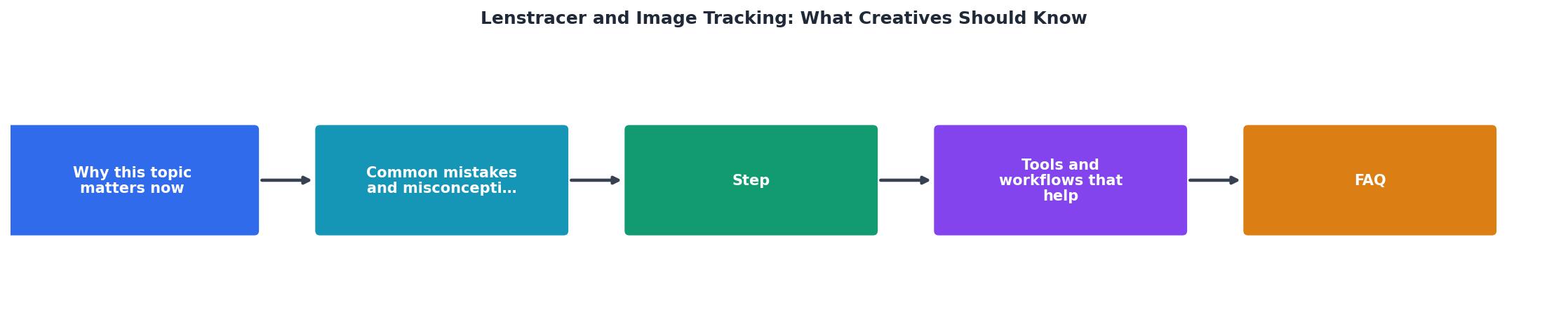
Step-by-Step Tracking Workflow
Here's the practical process:
1. Download and organize. When you acquire a new image, immediately rename it with a descriptive name (not image-2.jpg), add basic tags (platform, project, date), and store it in a consistent folder structure.
2. Log it in your inventory. Add the image to your master list with all the fields above. Include the direct link to the platform listing if available.
3. Run an initial reverse search. Use Google Lens, TinEye, or Lenstracer to confirm that only authorized uses appear. This catches cases where the platform was already hosting stolen or disputed content, you want to know before you build a client project around it.
4. Deliver with proof. When handing a project to a client, include a simple one-page "asset licensing summary" listing each image, its source, licence type, and expiration date. Make it clear what they can and cannot do with each image.
5. Audit periodically. Once a quarter (or when major projects launch), run a reverse search on your most critical images to check for unauthorized republication. Set alerts so you're notified if new instances appear.
6. Act on findings. If an image shows up in an unauthorized context, a competitor's website, an unlicensed republication, or a platform that shouldn't have it, document the location, take screenshots, and escalate to the licensor or your legal contact. Most platforms have clear DMCA/takedown procedures.
Tools That Work Together
No single tool does everything. Build a stack:
Google Lens (free, built into Google Search). Upload an image or take a screenshot. Google shows you where that image appears on the web. Quick, accessible, good for spot-checking.
TinEye (tineyecom, free + paid plans). Dedicated reverse image search engine. More accurate than Google for older or niche images. Paid plans offer batch uploads and alert subscriptions.
Lenstracer (lenstracer.com). Specifically designed for asset tracking across platforms. Integrates with Freepik, Shutterstock, Adobe Stock, and others. Tracks usage, flags duplicates, and maintains a searchable inventory. Best for teams managing hundreds of assets.
Platform-native tools: Freepik, Shutterstock, and Adobe Stock all offer download history, usage statistics, and licence details in your account dashboard. Use these as your primary source of truth for your purchases.
Metadata tools (Exiftool, or online EXIF readers). Check and preserve image metadata before handing off to clients. Ensures the chain of custody is recorded in the file itself.
Google Lens
TinEye
Lenstracer
The tool stack depends on your scale. Solo freelancers doing 5-10 projects a year? Google Lens + a spreadsheet + platform dashboards cover it. Agencies or product teams with hundreds of assets monthly? Lenstracer + TinEye alerts + a centralized DAM make sense.
Copyright Protection Through Tracking

Here's the hard truth: you can't prevent someone from copying your work. But you can create a documented trail that proves you did everything right on your end.
When an image licensing dispute happens (and if you work in creative long enough, it will), the first question is always: "Do you have proof this was licensed?" A reverse image search showing the image appeared only in authorized contexts, combined with your purchase receipt and licence terms, is that proof.
Example scenario: A client's social media manager uses a Canva image in a paid ad campaign. Canva's terms allow social media use in a free plan, but not paid ads. Someone flags the ad. You get a cease-and-desist notice.
If you have:- A dated record of the image source (Canva, free plan, downloaded on X date)
- Your client's confirmation that they agreed to non-paid-use terms
- A reverse search showing no unauthorized copies before the ad date
What tracking protects you from:
- Accidental client misuse. Client's internal team repurposes an image beyond agreed scope. Your reverse search catches it; you notify the client; they remove it. Crisis averted before it becomes a public liability.
- Platform re-listing disputes. You buy an image only to find out later the licensor is disputing its validity on the platform. Reverse tracking shows it was already being sold when you bought it (not your fault). You're on solid ground.
- Freelancer/employee carelessness. Team member downloads an image for a "quick test" in a personal project, forgets about it, and a year later that personal project goes semi-public. Your tracking alerts catch it.
- Supply-chain republication. Your client uses your deliverable in a case study, a supplier republishes the case study, another vendor republishes the vendor's republication. Each layer may introduce unlicensed asset copies. Tracking shows the chain; you can document where it broke.
Licence Management at Scale

For teams managing shared stock subscriptions across multiple projects, tracking becomes a governance issue.
Centralize your platform access. Don't let individual team members buy from their own Freepik accounts. Use a shared team account. All purchases go into one place; you control the inventory.
Set clear policies. Document what images can be used for (web, print, video, client work, internal-only). Make it part of your creative brief and client agreement.
Automate reminders. If a licence expires in 30 days, you want to know before assets go live. Set calendar reminders or use platform notifications.
Audit on handoff. When a team member leaves or a project ends, pull a list of assets they used. Verify each is still licensed and being used appropriately.
Use Licence Downloader for bulk verification. Platforms like Licence Downloader streamline the process of bulk-downloading your purchase receipts and licence certificates from multiple platforms at once. Instead of logging into Freepik, then Shutterstock, then Adobe Stock separately, you pull your entire licence portfolio in one go. That's the paper trail you need for audits.
Actionable Tracking Checklist
Image Tracking and Asset Audit Checklist
Your progress is saved automatically in your browser.
FAQ
Frequently Asked Questions
Building a tracking system takes a few hours upfront. Maintaining it takes 30 minutes a quarter. The peace of mind, knowing exactly what you own, where it is, and that you can prove it, is priceless when a licensing question comes up. Start with your current project assets, add to the inventory as you download new images, and run your first reverse search this week. You'll be ahead of 90% of creatives just by having a record.
What's your biggest challenge right now: tracking where your images end up online, or keeping receipts organized across platforms?