
You open your inbox on a Tuesday morning and find a formal notice from Pointer Brand Protection acting on behalf of a stock media rights holder. The claim says you used a licensed image without proper authorization, and they want compensation. Your stomach drops. This guide walks you through exactly what to do next, step by step, so you respond correctly and protect yourself.
Photo by Trilhaetribos Trilhaeribos from Pexels
TL;DR:- Pointer Brand Protection sends copyright infringement claims on behalf of image rights holders, often targeting freelancers and small businesses who used stock images without verifiable licence proof.
- Your first move is always to locate your licence certificate for the flagged image before responding.
- Having organized, downloadable licence records turns a stressful legal threat into a five-minute administrative task.
What Pointer Brand Protection Actually Does
Pointer Brand Protection is a brand protection agency that represents photographers, illustrators, and stock media companies. Their business model is straightforward: they use reverse image search technology and web crawlers to find images used online, then cross-reference those uses against the rights holder's licence records. When they find a mismatch or cannot verify a valid licence, they send a claim letter demanding payment.
These letters are not scams. They carry legal weight. But receiving one does not automatically mean you owe money. It means someone could not verify your licence for a specific image, and you need to prove you have one.
The good news: a significant majority of these claims get resolved without payment when the recipient can produce a valid licence certificate quickly. The bad news: most freelancers and small teams cannot find their licence proof when they need it.
That gap between needing proof and having proof is where the real problem lives.
Why These Claims Hit Freelancers Hardest

Agencies and large companies usually have legal departments and asset management systems. A freelance designer working across Freepik, Adobe Stock, and Shutterstock does not. Here is what typically goes wrong:
- You downloaded an image two years ago from a platform you no longer subscribe to.
- The project is finished and the client has been using the image on their website ever since.
- You never saved the licence certificate because the platform did not make it obvious, or you assumed the download receipt was enough.
- The claim arrives and you cannot prove the image was legitimately licensed at the time of use.
Common Mistakes When Responding
People make the same errors repeatedly when they get a Pointer Brand Protection letter. Avoid these:
- Ignoring the claim. This escalates the situation. Pointer Brand Protection follows up, and the amounts increase. Silence is interpreted as an admission.
- Paying immediately without checking. Some recipients panic and pay the settlement amount without verifying whether they actually have a valid licence. Check first.
- Sending a screenshot of a download page. A screenshot of your Shutterstock download history is not a licence certificate. Pointer Brand Protection wants the actual licence document that specifies the usage rights.
- Arguing about fair use. Stock image usage in commercial design work almost never qualifies as fair use. Do not go down this path.
- Blaming the client. If you downloaded the image under your account, the licence is tied to you. The client relationship is separate from the copyright question.
"By being specific about the goods or services your trademark represents in your registration, you clearly identify the scope of use.">, Guide to Brand Protection for Small and Medium Sized Enterprises Section 2
This principle applies directly to stock licences too. A licence that covers "web use" does not cover "print advertising." Specificity in your licence terms is your defense.
Step-by-Step Response Process

Here is the exact process to follow when you receive a claim. The diagram below summarizes the flow, and the detailed steps follow.
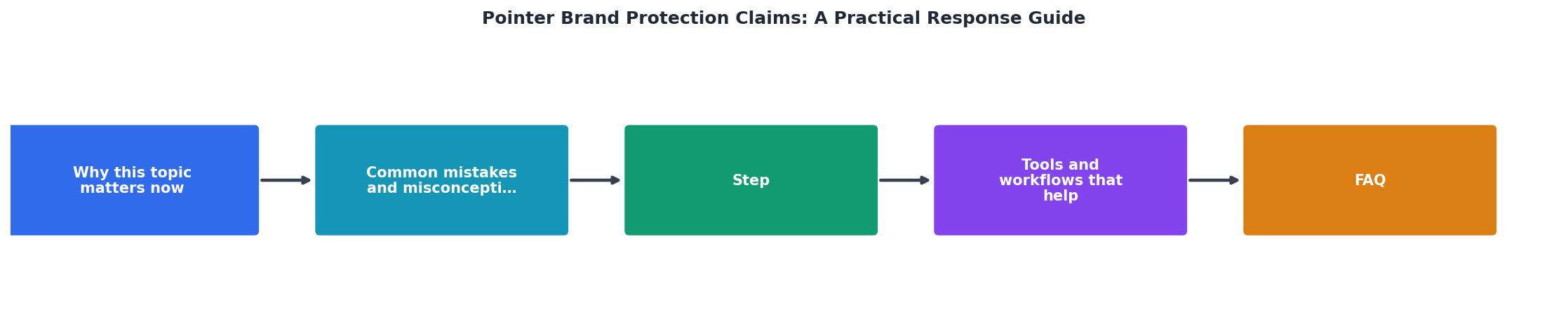
1. Read the claim carefully
Identify the specific image, the rights holder, the alleged infringement URL, and the deadline. Note the reference number. Do not skip any details.
2. Locate the image in your files
Find the original file on your computer or cloud storage. Match it to the image referenced in the claim using the filename, dimensions, or visual comparison.
3. Find your licence certificate
Log into the platform where you downloaded the image. Navigate to your download history or licence section. Download the licence certificate PDF or screenshot the licence details including:- Licence type (standard, extended, editorial)
- Download date
- Your account name
- The specific image ID
4. Verify the licence covers the usage
Check that your licence type permits the way the image was used. A standard licence on Shutterstock covers most digital and print uses up to 500,000 copies. An editorial licence restricts commercial use. Make sure the usage matches.
5. Respond in writing
Send your licence proof to Pointer Brand Protection using their provided contact method. Include the claim reference number, the licence certificate, and a brief statement confirming the image was licensed at the time of use.
6. Follow up if needed
If you do not hear back within 14 days, send a follow-up. Keep copies of all correspondence.
Tools and Workflows That Help
The manual process of logging into five different stock platforms, searching download histories, and exporting licence PDFs one by one is brutal when you have dozens or hundreds of images to account for. This is where having a system matters.
Licence Downloader at licencedownloader.com lets you bulk-download licence certificates from platforms like Freepik, Shutterstock, Adobe Stock, Envato Elements, iStock, and Canva in one session. Instead of spending an afternoon clicking through platform dashboards, you get all your proof files organized and stored locally.
Here is a comparison of the manual approach versus using a dedicated tool:
| Manual Approach | With Licence Downloader |
|---|---|
| Log into each platform separately | Connect all platforms once |
| Search download history per image | Bulk-export all licence certificates |
| Save PDFs one at a time | Batch download in minutes |
| No consistent naming or organization | Organized by platform and date |
| Repeat every time a claim arrives | Proactive archive ready before claims |
The following card shows what a typical freelancer's licence response timeline looks like when records are organized versus when they are not:
Claim Response Timeline Comparison
Building a Claim-Proof Workflow
Prevention beats response every time. Here is how to set up a workflow that makes Pointer Brand Protection claims a non-event:
- Download licence certificates at the time of purchase. Every stock platform offers some form of licence proof. Grab it immediately.
- Name files consistently. Use a format like
platform-imageID-date-licencetype.pdf. Example:shutterstock-1234567-2026-01-15-standard.pdf. - Store licences alongside project files. When you deliver a project to a client, include a
/licencesfolder with the relevant certificates. - Run monthly bulk exports. Use a tool like Licence Downloader to catch anything you missed during the month.
- Keep records for at least five years. Copyright claims can surface years after the original use. Do not delete old licence files.
Pointer Brand Protection Claim Response Checklist
Your progress is saved automatically in your browser.
FAQ
Frequently Asked Questions
Additional Resources
- Pointer Brand Protection Is Now a Part of Corsearch - Since its inception in 2008, Pointer Brand Protection removed counterfeits and other forms of brand abuse on behalf of global businesses.
- Guide to Brand Protection - STEP 1: Register Your Trademarks · STEP 2: Develop a Broader Registration Strategy · STEP 3: Research Brand Protection on E-Commerce Platforms · STEP 4: Build ...
- Brand protection guide from Marks & Clerk drives media ... - The e-book outlines how retailers can protect their brand, and the associated products and services, through IP rights and safeguard them ...