
Black Friday campaigns pack months of planning into weeks of execution, and the last thing you want is a copyright claim derailing your biggest sales event. Most teams scramble to launch graphics, emails, and ads without verifying that every stock image is actually licensed, a gap that can cost thousands in takedowns, legal notices, or forced rebrand cycles. An audit list isn't busy work; it's the difference between a smooth campaign and a legal nightmare that eats your profit.
Photo by https://kaboompics.com/ from Pexels
TL;DR:- Audit all stock images in your Black Friday campaign at least 2 weeks before launch to catch licensing issues early.
- Document every licence source, usage rights, and expiration date in a central spreadsheet or tool.
- Check that commercial, extended, and social-media usage rights match your campaign's actual use (ads, email, website, print).
- Use bulk-download tools to grab all licence certificates at once instead of hunting them manually across platforms.
- Flag any free-tier, trial, or uncertain-status images and replace them before go-live.
Black Friday campaigns move fast. Designs are locked, ads are queued, and emails are scheduled. But the licence audit, the boring, often-skipped step, is exactly when problems hide. A designer grabs an image from the free tier of Freepik without realizing the campaign will use it in paid social ads (commercial use, not free-tier eligible). An agency's freelancer downloads from a trial account that expired last month. A small-business owner uses a Canva image in an Amazon listing without reading the fine print about extended licences. None of these violations are intentional, but all of them are expensive.
Early planning interest is high, shoppers start hunting deals months in advance. This means your campaign assets need to be bulletproof from day one. A single copyright claim or platform takedown during your peak sales window doesn't just kill that asset; it disrupts your timeline, forces emergency rebrands, and erodes customer trust. The licence audit is your insurance policy.
Why this audit matters now
Black Friday is not a calm month. Traffic spikes, customer service scales, and every team member is stretched thin. The audit feels like overhead, something to skip or rush. But this is precisely when copyright trolls and automated image-matching systems are most active. Platforms like Meta, Google, and Amazon scan billions of ad pixels and product listings during peak selling season. An unlicensed image that nobody noticed in July suddenly surfaces in a claim during your highest-revenue day.
Three specific pressures make Black Friday campaigns especially risky:
Multiple platforms, multiple licences. You're probably using images across email, website, paid ads, social media, and possibly print. Each platform has different usage rights. A Freepik image licensed for "web" might not cover paid social ads. A Canva template's images might exclude e-commerce use. Mixing these up is the most common audit failure.
Rapid iteration and last-minute swaps. Black Friday creative often changes week-to-week as performance data rolls in or strategy shifts. A designer swaps out an image at 11 p.m. the night before launch and forgets to check the new one's licence. These corner-case images are what audits catch.
Team sprawl and shared accounts. If you're working with freelancers, contractors, or multiple internal designers, you lose visibility into what they've licensed. A contractor might grab images from their personal Shutterstock account (licensed to them, not your business) without realizing you can't use them in client deliverables. An audit forces this visibility.
"Shoppers are already talking about Black Friday deals as early as September, and 51% say they want access to Black Friday discounts a month before November.">, Black Friday campaign checklist
Common mistakes and misconceptions
Before you audit, know what doesn't work:
"We bought it, so we own it." You don't. Buying an image licence grants usage rights, not ownership. A $10 Shutterstock download for "web use" doesn't let you print it on merchandise or use it in a feature film. Read the licence terms every time.
"It was free, so it's safe to use anywhere." Free stock sites (Unsplash, Pexels, Pixabay) are genuinely free for most uses, but they're not all-rights-granted. Many restrict commercial use, and some require attribution. A free image isn't automatically risk-free; it just has different rules.
"One licence covers all our channels." Standard licences are usually limited to one medium: web, print, email, or social. Extended licences (which cost extra) broaden usage. If your campaign touches five channels, you might need five different licence tiers or one extended licence for each image.
"The freelancer handles licensing, so it's their liability." Wrong. Your business uses the final asset, you're the liable party if it's unlicensed or misused, regardless of who created it. Audit what your team delivers.
"We'll deal with claims later." By then it's too late. A takedown notice during a live campaign forces you to rebuild, relaunch, and apologize to customers. Audit before go-live.
Step-by-step audit approach
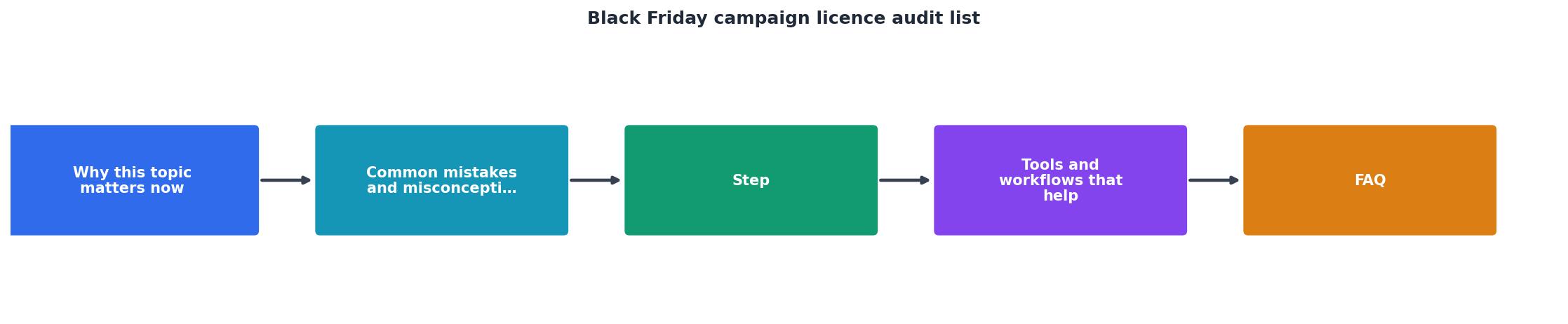
An audit isn't complicated, but it's systematic. Follow these steps roughly 2–3 weeks before campaign launch:
Step 1: Create a master asset inventory
List every image in your campaign. Create a spreadsheet (or use a tool like Airtable or Notion) with these columns:
- Image name or filename
- Platform it came from (Freepik, Adobe Stock, Shutterstock, Canva, etc.)
- Account it was licensed under
- License type (e.g., "Standard Web", "Extended", "Free")
- Usage rights (web, social, email, print, commercial, etc.)
- Expiration date (if applicable)
- Where it's used in the campaign (email header, ad 1, product page, etc.)
- Audit status (Pass/Flag/Replace)
Step 2: Verify each image's licence and rights
Go to each platform (Freepik, Adobe Stock, Shutterstock, Canva) and pull the original licence details. Do not rely on what the designer told you; check the source. Here's what to verify:
- Is the account that licensed it still active? Trial accounts and free trials expire. If a freelancer used their personal trial, the licence is void.
- Does the licence allow commercial use? Black Friday campaigns are commercial, so free tiers and personal-only licences don't qualify.
- Does it cover your specific channels? If you're running paid social ads, the licence must explicitly allow paid social use (not just "web"). If you're using the image in email, check email rights.
- Is it extended-licence eligible if needed? If standard rights don't cover your use case, can you upgrade to extended (and are you willing to pay)?
Step 3: Cross-check campaign usage against licence restrictions
Now compare how each image is actually used in the campaign against what its licence permits. For example:
- A Freepik "Standard Web" image used only on your website: Pass.
- The same Freepik image also used in a paid Instagram ad: Flag (requires extended or different licence).
- A Canva template image used in a product listing on Amazon: Flag (Canva's standard licence excludes e-commerce resale).
- A Shutterstock image with an expired account: Replace (licence void).
Step 4: Download and store all licence certificates
Once you've verified each image, download its licence certificate or proof of purchase. Platforms usually bury this in account settings or order history. Batch-download where possible (many platforms support bulk export). Store everything in a central location, cloud folder, password-protected archive, or a tool like Licence Downloader that handles this automatically.
This step is tedious but critical. A licence certificate is your only proof if a claim surfaces months later. Without it, you have no defence.
Step 5: Flag and resolve issues
For every flagged image, you have three options:
- Get an extended licence. If the image is perfect and just needs wider usage rights, buy the upgrade. Cost: $5–$50, depending on the platform.
- Restrict the image's use. If you flagged it because it was going into paid ads, remove it from ads and use it only on your website or email. Update your campaign plan.
- Replace it. Find a different image with the right licence. This is often the fastest option if launch is close.
Step 6: Get stakeholder sign-off
Before launch, have your legal/compliance person (or your team lead) review the audit. They should sign off on the risk profile, essentially confirming that all images are either verified or consciously accepted as a calculated risk. Document this sign-off in an email or checklist. If a claim ever surfaces, that paper trail proves you audited diligently.
Tools and workflows that help
Manual audits work, but they're error-prone and slow. A few tools can cut the time in half:
Spreadsheet templates. Start with a Google Sheet or Excel template pre-loaded with columns and example rows. This removes the friction of designing your own structure and keeps your team consistent.
Bulk-licence downloaders. Tools like Licence Downloader let you connect your Freepik, Shutterstock, Adobe Stock, and other stock accounts and bulk-export all licence certificates in minutes instead of manually hunting each one. This is the biggest time-saver, especially if you've used hundreds of images over the year.
Image inventory tools. Airtable and Notion allow you to attach images directly to records, so you can see the visual alongside the licence details. This prevents you from accidentally mixing up two similar images.
Automated rights-matching tools. Some agencies use tools that map image metadata to licence restrictions and flag mismatches automatically. These are more expensive but catch edge cases humans miss.
Shared asset libraries. If your team uses a DAM (Digital Asset Management system) like Frame.io, Sync, or Adobe Experience Manager, you can tag every asset with its licence status as it's uploaded. Audits become continuous instead of a one-time sprint.
A practical audit workflow for Black Friday
Black Friday Audit Timeline
This timeline assumes a typical Black Friday campaign launching in November. If your campaign is smaller or you're working with fewer assets, compress it. If you're a large agency managing multiple brands, start earlier.

Practical audit checklist
Use this checklist to keep your team on track:
Black Friday Campaign Licence Audit Checklist
Your progress is saved automatically in your browser.
FAQ
Frequently Asked Questions
Additional Resources
- Black Friday Checklist: A 52-Spot audit for retailers - Get ready for Black Friday with our X-Spot last-minute audit for retailers with our Black Friday checklist. Check this essential Black ...
- Black Friday campaign checklist - Run a data audit. Conduct a complete data audit to evaluate how you measure and report on your marketing outcomes. What's working? What isn't?
- The Best Black Friday Marketing Campaigns Ever - Digital marketing is a tech solution too, you know. Here's a look at some of the best Black Friday marketing campaigns in history.
Need to Download Your Licences?
Save hours of manual work. We download all your stock photo licence certificates for you.
Get Started“Thanks to LicenceDownloader.com, I was able to download more than 1,000 Freepik licences and receive them all at once via ZIP.”
Marlon Mainardy