Client handoff licence pack checklist
Handing off a project to a client without proof of licence for every asset is like selling a car without the title. You think the deal is done, but legally and contractually, you've left both yourself and your client exposed. A missing licence certificate can turn into a copyright claim, a takedown notice, or worse: a client dispute months later when they discover they're not actually allowed to use an image the way they want to.



Handing off a project to a client without proof of licence for every asset is like selling a car without the title. You think the deal is done, but legally and contractually, you've left both yourself and your client exposed. A missing licence certificate can turn into a copyright claim, a takedown notice, or worse: a client dispute months later when they discover they're not actually allowed to use an image the way they want to.
This checklist walks you through building a bulletproof licence pack before you close out any project. No surprises. No liability gaps. Just clean handoff documentation that protects everyone.
TL;DR:- Collect licence certificates from every stock platform where you sourced assets before project delivery.
- Organize by platform, date, and asset name so clients can find proof instantly.
- Document usage rights clearly, what the client can and cannot do with each image.
- Include platform account info and licence type (standard, extended, commercial) for each asset.
- Deliver the pack as part of your final project folder with a simple index or README.
Why this matters now
Stock-media platforms make buying images frictionless, but they don't make managing proof easy. Freepik, Shutterstock, Adobe Stock, Envato, iStock, and Canva all store licence info in different places, export it differently, and rarely auto-deliver certificates with your download. That's your job.
Here's the reality: clients ask for proof later. Sometimes it's routine (their legal team auditing a campaign). Sometimes it's urgent (a platform or competitor flagged an image as unlicensed). Either way, if you don't have documented proof, you look unprepared and your client looks unprotected. Both damage trust.
Worse, some clients resell or repurpose content after the project ends. If they use an image beyond the scope of their licence, the platform can pursue them, or you, if your contract doesn't clearly assign liability. A comprehensive licence pack prevents that ambiguity entirely.
The time to build this pack is before you hit "send final files." Not after a client calls with a legal question.

Common mistakes and misconceptions
Mistake 1: Assuming the download receipt is proof enough.
A receipt shows you bought something. It doesn't show the client what they're allowed to do with it. Some designers hand over their own invoice and call it done. That's not a licence document, that's accounting.
Mistake 2: Only documenting expensive assets.
You tracked the paid Adobe Stock images but forgot the three "free" Unsplash photos embedded in the design. Unsplash has its own licence terms (Unsplash Licence, usually permissive but not universal). Document everything, even if it's free.
Mistake 3: Treating all licences as identical.
A standard Shutterstock licence and an extended Shutterstock licence have different usage rights. One might allow print-only; the other allows unlimited digital and print. If you hand over the wrong document or don't clarify, the client might violate the licence unknowingly, and think it's your fault.
Mistake 4: Losing track of which asset came from where.
You used three stock platforms on one project. Six months later, a client asks, "Where did this image come from?" You can't remember if it was Freepik or Canva. Now you're digging through old project files or, worse, telling the client you don't know. Document it immediately.
Mistake 5: Not including usage restrictions.
The licence document says a lot. But clients don't read fine print. You need to translate it: "This image can be used for web, social, and print. It cannot be resold or used in competing products without an extended licence."
Step-by-step approach

Step 1: Audit your project assets
Before you do anything else, list every image, vector, or design element in the project that isn't original. Use a spreadsheet or simple document with columns: asset name, file name, platform source, licence type, and date acquired.
Go through your design files systematically. Don't rely on memory. Many designers use libraries or stock integrations in their design tools (Figma plugins, Adobe Stock inside Illustrator) and forget they're even using third-party assets.
Step 2: Download or export certificates from each platform
This is where platform differences bite you. Each one works differently:
- Freepik: Log in, go to Your Account > Downloads > Licences, select the image, and download the certificate PDF.
- Shutterstock: Account > License History, find the image, click "Download License Certificate."
- Adobe Stock: Libraries panel > right-click the asset > Get License Info. Or go online to your account and export batch licences.
- Envato Elements: Account > All Downloads, select items, click "Download Licenses."
- iStock: Account > Licenses, search by image, download the certificate.
- Canva: For Canva Pro/Team assets, export a design and Canva embeds licence info in metadata. For purchased elements, download from your library.
Step 3: Create a master spreadsheet or document
Consolidate all certificates and metadata into one place. Include:
- Asset name and file name (how it appears in the project)
- Thumbnail or description (so the client knows which image you mean)
- Platform and licence ID (proof of where it came from)
- Licence type (Standard, Extended, Commercial, etc.)
- Usage rights (web, print, social, commercial use, resale restrictions, etc.)
- Expiration or terms (annual subscription vs. perpetual licence)
- Date acquired (when you purchased or downloaded it)
Step 4: Clarify and translate usage rights
Your client might not understand what "standard commercial licence" means. Write a simple summary for each platform:
- Freepik Standard Commercial: "Can be used for commercial projects, web, and print marketing. Cannot be sold as-is or used in competing design template products."
- Shutterstock Standard Licence: "One-time use for the specific project. Cannot be resold or sublicensed. Print and digital use allowed."
Step 5: Bundle and deliver
Create a folder in your project deliverables structure called Licenses or Licence Pack. Inside:
- A README or index file listing all assets and their corresponding certificate files.
- All PDF licence certificates (named clearly:
freepik-sunset-bg-001.pdf, etc.). - The master spreadsheet with usage summary.
- Any platform account info the client needs (e.g., "Shutterstock licence purchased under account [email]. Account holder can download additional uses if needed.").
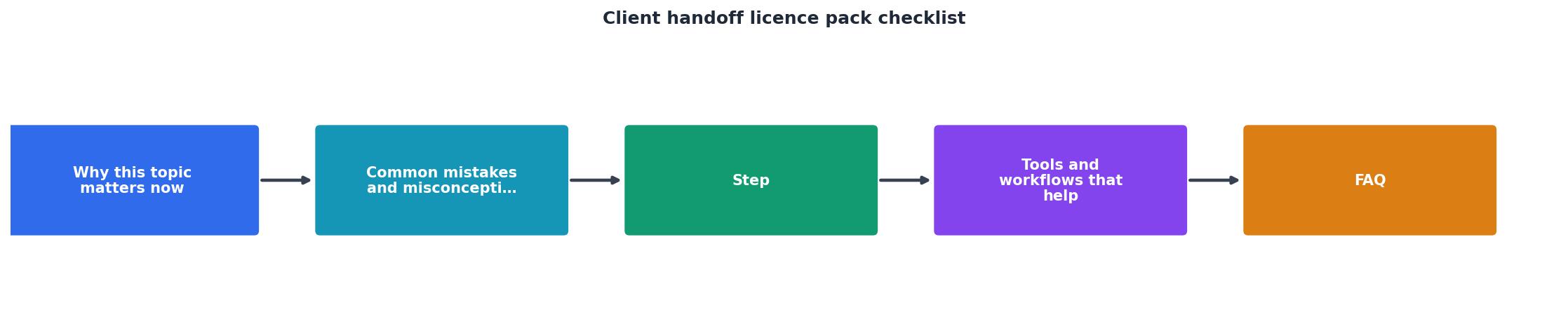
Tools and workflows that help
Spreadsheet templates: Google Sheets or Excel with pre-built columns save time. Create a template you reuse for every project.
Browser bookmark organizer: Keep quick links to each platform's account > downloads page. You'll audit faster.
Screenshot tool: Snipping Tool or Greenshot for capturing purchase history if certificates aren't available.
Cloud storage automation: Use Zapier or Make to auto-export licence info from platforms (if APIs are available) into a central folder.
Licence Downloader: If you work with multiple teams or clients and manage dozens of assets per month, a bulk licence downloader tool can export certificates from multiple platforms at once, saving hours of platform-hopping.
Client portal template: If you use a delivery system (Dropbox, Figma, or a custom portal), add a licence pack section as a standard deliverable template so you never skip it.
Typical Project Licence Pack
The visual above shows what a fully documented licence pack looks like for a typical small-to-medium project. All assets accounted for, all platforms covered, all restrictions documented. That's the goal: nothing left to guesswork.
Client Handoff Licence Pack Checklist
Your progress is saved automatically in your browser.
FAQ
Frequently Asked Questions
Building a client handoff licence pack is a small discipline that pays massive dividends. It protects your reputation, protects your client, and eliminates the confusion that leads to disputes months after project delivery. The pack takes an hour to build the first time and becomes faster every time you do it. It's worth the investment.
Additional Resources
- Customer Handoff Checklist - SimplySub - Use this customer handoff checklist to transfer completed work, provide project documents, review warranties, and complete a smooth project ...
- Client Onboarding Checklist & Template 2026 - Complete client onboarding checklist template — from signed agreement to kickoff-ready. Free to use. Includes how to enforce every step automatically.
- Client Handoff Checklist (Account Change) Template - You use it as a client handoff checklist template to capture background, goals, active work, risks, and key contacts whenever an account manager or team ...
Need to Download Your Licences?
Save hours of manual work. We download all your stock photo licence certificates for you.
Get Started“Thanks to LicenceDownloader.com, I was able to download more than 1,000 Freepik licences and receive them all at once via ZIP.”
Marlon Mainardy