Conducting an Internal Audit of Stock Licences
An internal audit of stock licences is your organisation's chance to catch compliance gaps before they become legal problems. Most agencies and teams discover that their asset usage doesn't match their licence terms only when a client asks for proof or a platform flags a violation. A structured internal audit turns that reactive scramble into a proactive, documented process that protects your work and builds client confidence.


An internal audit of stock licences is your organisation's chance to catch compliance gaps before they become legal problems. Most agencies and teams discover that their asset usage doesn't match their licence terms only when a client asks for proof or a platform flags a violation. A structured internal audit turns that reactive scramble into a proactive, documented process that protects your work and builds client confidence.
Photo by RDNE Stock project from Pexels
TL;DR
- Internal audits reveal where your team's actual usage deviates from licence terms, identifying compliance risk before audits or legal inquiries arrive.
- Set up a structured audit framework with clear scope, ownership, and timelines; collect licence data from all platforms and seats; compare usage against terms.
- Document gaps, rank them by risk, and implement fixes, from licence upgrades to process changes, then establish a monitoring cadence to stay compliant.
- Tools like Licence Downloader automate bulk collection and archiving, turning months of manual work into hours.
Internal audits exist for one reason: to close the gap between what you think is happening with your assets and what's actually happening. In most teams, that gap is bigger than expected. Designers rotate between projects and platforms. Freelancers bring external accounts. Subscriptions renew or lapse without clear handoff. One person knows that the Adobe Stock seat is limited to internal use; another doesn't. By the time compliance comes calling, you're caught off-guard and scrambling to reconstruct decisions from months ago.
A formal internal audit shifts you from reactive to deliberate. You own the conversation instead of defending yourself in it. You know where the exposure is, what to fix first, and how to prove you took reasonable steps to manage risk.
What is the purpose of an internal audit of stock licences?
An internal audit serves three linked purposes: visibility, accountability, and proof.
Visibility means mapping what you own. Every licence across every platform. Every team member's access. Every asset in active use or archived inventory. Most organisations discover they don't know the answers to basic questions: "How many Shutterstock seats do we have?" "Is Canva Pro commercial use allowed on our social ads?" "Who renewed the Envato subscription?" Audits force those answers out into daylight.
Accountability means tying usage to terms. You might have a Shutterstock seat, but if the licence says "internal creative review only" and you're delivering downloaded images directly to clients, you're out of compliance whether you intended to be or not. An audit compares the two and flags the mismatch.
Proof means you can show regulators, clients, or legal counsel that you did due diligence. When a client's legal team asks "Did you have the right to use this image in our campaign?" you can pull an audit report, a licence snapshot, and a date-stamped collection record. That documentation often ends the conversation before it becomes a problem.
For agencies in particular, that third point is survival. Your clients assume you're managing their legal risk. An audit is how you prove it.
How to set up an audit framework
Before collecting data, define the shape of your audit. An audit framework is simply the structure that keeps the work focused and repeatable.
Start with scope. Are you auditing only current active projects? All assets used in the past 12 months? All subscriptions and seats regardless of whether they're in active use? Most teams benefit from a rolling audit that covers the past 12–24 months of significant work, because that's what regulators and clients typically ask for. Decide upfront: what period are we covering, and which asset types (images, video, music, fonts, templates, stock footage)?
Next, assign ownership. Name a single owner, ops lead, compliance manager, senior producer, whose job it is to coordinate, deadline, and sign off. Without a named owner, the audit drifts. Set a timeline: audits can take anywhere from two weeks (small team, simple account structure) to two months (multi-seat, multi-platform, high volume). Build in buffer.
Identify stakeholders who will provide data or validate findings. That might include:
- The designer or team lead for each client project
- The accounts manager who knows which platforms are active and why
- Finance, if they manage subscriptions or vendor agreements
- HR or project management, if they track team membership and access
- Freelancers or contractors who use external accounts on your work
Finally, set deliverables. Your audit will produce: a licence inventory (what you have), a usage map (what you've used it for), a gaps report (where you're out of compliance), and an action plan (what you'll fix and by when). These become your audit file.

How to evaluate current licence management practices
Auditing what you have is easier than auditing what you use. Start with inventory.
Pull every licence and subscription agreement your organisation holds. Spreadsheet or document, doesn't matter. For each, note:
- Platform (Shutterstock, Adobe Stock, Freepik, Envato, Canva, Getty, iStock, etc.)
- Licence type (seat, subscription, per-download, perpetual, special agreement)
- Purchase date and renewal date
- Commercial use allowed? (Yes, No, Restricted)
- Download limits or seat limits
- Who owns the account (team member, department, shared)
- Where it's stored (email, finance records, Slack, password manager)
Map active usage by project or by team member, depending on your structure. For each significant project or campaign in your audit window, ask:
- What stock assets (images, video, templates, music) did we source and use?
- From which platforms?
- How did we use them? (Client deliverable, internal design mockup, promotional use, resale, etc.)
- Did we modify them (edit, composite, rebrand)?
- Are they still in use, or archived?
Document the current process for sourcing, storing, and verifying licences. Walk through: how does a designer find a stock image, download it, store the licence info, pass it to the client? Where does that record live? Is it consistent across the team? Most teams discover their process is half-documented, half-tribal knowledge, half-different for each platform. That inconsistency is usually where violations hide.
How to identify gaps in compliance
Gaps emerge when usage and licence terms don't align. The most common ones:
Use case mismatch: You have a Freepik Free licence (non-commercial only) but used that image in a paid client campaign. Or you have an Adobe Stock seat marked "editorial only" but delivered the asset for commercial advertising.
Attribution failure: Some licences require visible credit. You skipped it because the client didn't ask or you forgot it was in the agreement.
Modification restriction: The licence says "no derivative works" but your designer composited the image with others or heavily retouched it.
Seat or download overages: You have one Shutterstock seat but three people downloading from it, or you've hit a monthly limit and kept downloading anyway.
Extended use without extended licence: You're using an image in merch, packaging, or client resale but only bought a standard licence.
Freelancer or contractor licenses: An external designer used their personal Freepik account on your project. That account probably isn't licensed for commercial use on third-party work.
To find gaps, compare your usage map against your licence inventory:
- For each project or asset, note which platform it came from.
- Check the licence terms for that platform/seat.
- Ask: Does our actual use match what the licence allows?
- If no, flag it as a gap.

Rank gaps by severity:
- Critical: Direct violation (commercial use of a non-commercial licence) or high-value asset (brand-critical image used without proper licence).
- High: Likely violation or repeated pattern (multiple projects with same issue).
- Medium: Isolated incident, ambiguous terms, or low-visibility asset.
- Low: Correctable with updated process, no repeat risk.
How to document audit findings and implement improvements
Document everything. Your audit file becomes legal proof that you took compliance seriously. A sloppy or missing audit file looks worse than having no audit at all.
Create a Audit Report that includes:
- Audit scope and date range
- Audit team and owner
- Summary of findings (X licences reviewed, Y gaps identified, Z critical)
- Detailed gaps list (platform, asset/project, issue, severity, owner, deadline to fix)
- Root cause analysis (why did each gap happen? Process failure? Unclear terms? Turnover?)
- Action plan (what will we do, by when, who owns it?)
- Process improvements to prevent recurrence
Implement fixes in order of severity:
- Quick wins: Upgrade a licence, add missing attribution, delete non-compliant assets, stop using a platform for that use case. These close critical gaps and show immediate momentum.
- Harder fixes: Renegotiate a team member's account terms, switch platforms, refactor your freelancer onboarding to require compliant accounts. These take time but prevent systemic issues.
- Process changes: Update your creative brief template to ask for licence type. Add a pre-delivery checklist that flags licence terms. Create a shared licence registry so everyone knows what they can use each seat for. Build these into your workflow so they stick.
"The software license exists to protect the creator's intellectual property value, so organizations have to pay close attention to how they use each software product.">, A Practical Guide to Navigating Software License Audits
Real-world examples of internal audit processes
Example 1: Mid-size creative agency, 15 people
This agency had Shutterstock team seats, individual Adobe Stock subscriptions, and freelancers using Freepik. The ops lead ran a 3-week audit:
- Week 1: Collected all licence agreements and mapped team access (found a seat under a departed employee's name still active and paid).
- Week 2: Sampled 20 recent client projects and checked licence compliance (found 3 projects used non-commercial Freepik images in paid campaigns via freelancers).
- Week 3: Identified root cause (no template for freelancer onboarding, no pre-delivery audit) and implemented fixes.
Example 2: E-commerce brand, using Canva + Freepik
The owner ran a quarterly audit (2 hours per quarter) to spot-check social media and product listings:
- Q1: Found that product images used Canva templates without verifying commercial use was explicitly stated (it was, Canva Pro allows commercial).
- Q2: Found a third-party seller on their marketplace using Freepik images the brand had licensed (not allowed under Freepik terms, addressed by updating seller guidelines).
- Q3: No gaps found. Process working.
Example 3: Large agency, 40+ people, complex structure
This audit took two months:
- Mapped 8 different stock platforms across 12 team seats.
- Found 22 gaps, including two high-severity cases (images licensed for one client accidentally used for another; extended-use asset without extended licence).
- Created a shared licence registry in a Google Sheet with platform, licence type, and use case for each seat.
- Implemented a pre-delivery audit step where the producer verifies stock sources against the registry.
- Set a quarterly re-audit cycle.

The internal audit process at a glance
This diagram breaks down the key stages of a stock licence audit from setup to ongoing monitoring:
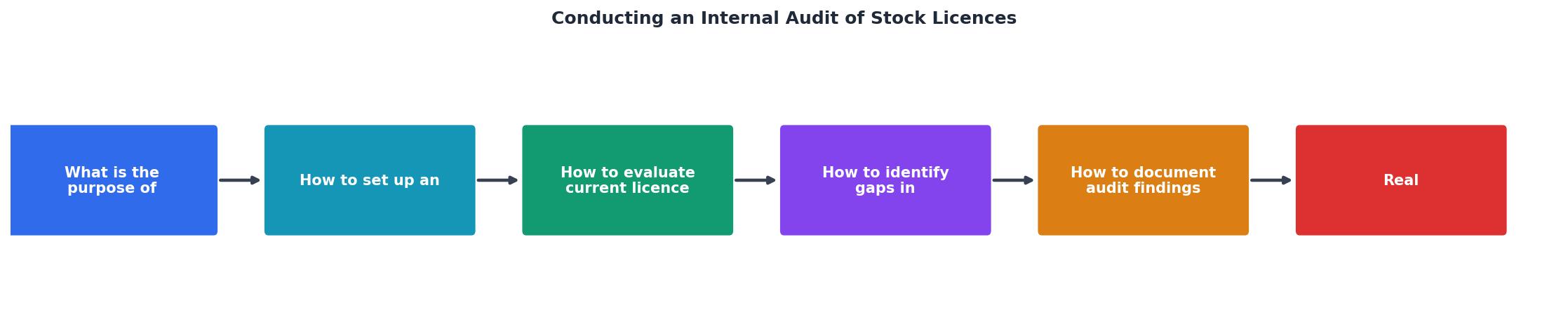
The flow moves from planning and data collection through evaluation and gap identification, then into action and monitoring. Notice that monitoring feeds back into the cycle, this isn't a one-time event but a repeating rhythm.
Sample internal audit checklist
Use this checklist to structure your first audit and ensure you don't miss critical steps.
Internal Audit Checklist for Stock Licences
Your progress is saved automatically in your browser.
Interactive audit readiness dashboard
To help you visualize where your organisation stands, here's an example of what a typical audit readiness snapshot might look like. This is a sample for a small agency that recently completed its first audit:
This kind of dashboard helps you track progress and spot bottlenecks. You can build one for your own audit using a spreadsheet or a simple document, the point is having a at-a-glance summary that keeps momentum going.
FAQ
Frequently Asked Questions
An internal audit isn't a compliance checkbox or a one-time exercise. It's the foundation of a repeating rhythm that keeps your team protected and auditable. Start with a clear scope, assign ownership, collect data ruthlessly, identify gaps honestly, and fix them deliberately. Document everything. Then do it again in a few months or a year, depending on your risk profile and volume.
The teams that nail this typically start imperfect, they discover gaps, feel the sting of not knowing their own exposure, and then they build the process muscle to stay ahead of it. The first audit is hard. The second is routine. By the third, you're spot-checking instead of scrambling, and your clients notice the difference.
Additional Resources
- A Practical Guide to Navigating Software License Audits - Learn how to proactively manage software licenses and follow best practices to avoid penalties and compliance risks during a vendor audit.
- How to Conduct a Software License Audit - Tropic, procurement - A good audit follows the same cycle: scope, inventory, reconcile, validate, remediate, and document. The important shift is to look for waste as ...
- The IIA Licensing Programs - IIA Licensing. The IIA makes a license freely available to members and the internal audit community for use within their organization.
Need to Download Your Licences?
Save hours of manual work. We download all your stock photo licence certificates for you.
Get Started“Thanks to LicenceDownloader.com, I was able to download more than 1,000 Freepik licences and receive them all at once via ZIP.”
Marlon Mainardy