Envato licenses: Practical Guide
Envato Elements and Envato Market offer two completely different licensing models, and mixing them up can cost you credibility with clients. This guide cuts through the confusion and shows you exactly what you can do with what you buy, how to download your proof, and how to stay protected when delivering to clients.

Envato Elements and Envato Market offer two completely different licensing models, and mixing them up can cost you credibility with clients. This guide cuts through the confusion and shows you exactly what you can do with what you buy, how to download your proof, and how to stay protected when delivering to clients.
Photo by Pavel Danilyuk from Pexels
TL;DR:- Envato Elements gives you unlimited use of all items in the subscription, but you can't sell the item itself or redistribute it.
- Envato Market requires a separate license purchase per item, with commercial use available only if you buy the extended license.
- Always download your license certificate immediately after purchase, it's your proof for clients and audits.
- Store licenses centrally (not scattered across email or platform dashboards) so you can find them when a client or legal team asks.
This guide walks you through both platforms, shows you what each license actually covers, and gives you a repeatable system so you never lose track of what you're licensed to use or where to find proof.
Why this matters right now
Scattered licenses across multiple platforms and email accounts create two real problems. First, you waste billable time hunting for a license when a client needs proof. Second, you risk using an asset beyond its license scope because you forgot whether you bought commercial rights or not.
Envato platforms process roughly 8 million downloads monthly. With that volume comes a steady stream of creators who download, use, then can't find their license later. When a brand client's legal team requests documentation, or when you're onboarding a new client with existing assets, that proof matters. Having it organized and accessible saves hours and protects your reputation.
Common mistakes and misconceptions
Mistake 1: Thinking Envato Elements means you own the item. You don't. You have the right to use it in unlimited projects, but you cannot sell the item itself, give it to a client to resell, or redistribute it to others. The license is for your use only.
Mistake 2: Confusing the standard license and extended license on Envato Market. The standard license lets you use a graphic, template, or font in one end product for commercial use. The extended license lets you use it in multiple end products or resell it. Don't assume commercial use is allowed, check the listing before you buy.
Mistake 3: Not downloading the license certificate immediately. Envato sends license info to your account, but not always to email. If you wait weeks or months to download proof, you'll struggle to reconstruct what you bought and when. Download it right after purchase.
Mistake 4: Using Envato assets in client files without documenting which asset came from Envato. When you hand a deliverable to a client, they don't know (and shouldn't have to know) where every component came from. You do. Document your sources in a layer note, a readme file, or your project archive so you can prove licensing if needed later.
Mistake 5: Assuming all Envato graphics are licensed for resale. They're not. Most are licensed for use in end products only. If you're creating a design template to sell on your own platform or marketplace, you need to buy items with commercial + extended licenses, or use items from Envato Elements (which allows unlimited end products, not resale).
Understanding Envato Elements licenses

Envato Elements is a subscription. You pay monthly or annually and get unlimited downloads of everything in the library: graphics, templates, fonts, stock video, music, add-ons, and more.
Here's what the Envato Elements license actually says:
"The license starts when you download and install the Item, and you can then use the Font or Add-on to create as many projects as you like.">, Envato Elements License This means you can:
- Use an Envato Element in unlimited personal and commercial projects
- Use it in client deliverables (templates, graphics, fonts, video)
- Modify, customize, and adapt it to your brand
- Sell the end product (e.g., the final design, the printed item, the published website)
- Sell or distribute the item itself (e.g., share the template file, font file, or graphic file as-is with another person)
- Use it as a resale-ready item (e.g., create a template pack and sell the templates themselves on Gumroad or Creative Market)
- Republish it to another marketplace or platform
- Remove the credits or attribution requirements (though most Elements items don't require attribution)
Where to find and download your Elements licenses
Log into your Envato Elements account. Click your profile icon (top right) and select Downloads. You'll see a list of every item you've downloaded. Click the item name, then look for a Download button or License Certificate link. Some items show the license directly; others let you export a PDF.
Save each certificate to a folder or cloud storage immediately. Don't rely on the Envato platform to keep your history, if your account is hacked or deleted, that proof goes with it.
Understanding Envato Market licenses
Envato Market is the original marketplace where creators sell individual items. Every item has a license attached. Most use the Standard License or Extended License. Some are GPL, some are free, and rare items use custom licenses.
Standard License (Envato Market)
The Standard License is the default. It costs less and is the most common. With a Standard License, you can:- Use the item in one end product (final deliverable) for commercial or personal use
- Modify and customize it
- Sell the end product to clients or the public
- Use it in multiple end products (e.g., one template license, but you design 10 client sites with it, not allowed)
- Resell the item itself
- Use it as a component in a product you're selling (e.g., bundle it with other templates to sell as a pack)
- Give or license it to another person
Extended License (Envato Market)
The Extended License costs more but removes limits. With it, you can:- Use the item in unlimited end products (same template in 50 client projects, each sold separately)
- Resell or redistribute it (e.g., include it in a template pack you sell, or in an add-on you distribute)
- License it to others under the same Envato terms
- Use it in printed, digital, or commercial projects without per-use limits
Determining which license you have
Open your Envato Market account and go to Purchases. Click any item. The license type is listed clearly: Standard or Extended. If you're not sure, email Envato support with your order number, they'll confirm in a few hours.
Where to find and download your Market licenses
Go to Purchases > select the item > scroll down to License Certificate. A PDF link appears. Download and store it. Unlike Elements, Envato Market doesn't give you license history by default, so the certificate is your only proof. Save it.
Building a repeatable license system
The best system is one you actually use. Don't over-engineer it.
Step 1: Create a central license folder. Use Google Drive, Dropbox, OneDrive, or a local hard drive folder. Name it something obvious: Licenses / Stock Licenses / Proof of Purchase. Inside, create subfolders: Envato Elements, Envato Market, Adobe Stock, Freepik, etc.
Step 2: Download your certificate right after purchase. The moment you buy or download, grab the license PDF. Don't wait. Don't tell yourself you'll do it later. Download it then.
Step 3: Name the file clearly. Use this format: [Platform]_[ItemName]_[PurchaseDate]_[License]. Example: Envato-Market_MinimalCV-Template_2025-09-15_Standard. This makes it easy to search and identify what you have.
Step 4: Store the original asset file alongside the license. If you buy a template, store the template file in the same folder as the license. Organize by client or project if that makes sense. The idea is simple: when you deliver a project to a client, you can quickly say "here's the template I used, here's the license proving I can use it."
Step 5: Keep a master spreadsheet. Create a simple sheet with columns: Date, Platform, Item, License Type, Use Case (Client X, Personal, Resale, etc.), Notes. Update it monthly. You now have a searchable record.
License compliance when delivering to clients

When you hand a client a final deliverable (a website, a design file, a video, a printed piece), they now own the end product. But they don't own the components. If the end product includes a stock font, a graphic template, or a video transition from Envato, you need to make sure they understand what they can do with it.
The best approach: include a brief Assets Used document in your project handover.
Example format:- Font: Montserrat Bold (Google Fonts, free, open license)
- Template: Minimal CV Template (Envato Market, Standard License, single use only)
- Graphics: 3x abstract backgrounds (Envato Elements subscription)
This protects you. The client now knows there are licensing boundaries. If they later use the template in 10 different projects without buying an extended license (and you didn't give them permission), that's their violation, not yours.
When you need an extended license
You need an extended license (Envato Market) or Elements subscription in these cases:- You're designing a template and selling it yourself (each sale needs an extended license for the components)
- You're creating a client template they can reuse internally (reuse = multiple end products)
- You're including the item in a software, plugin, or add-on you're distributing
- You're licensing the design to another designer to use in their work
Step-by-step process for first-time purchases
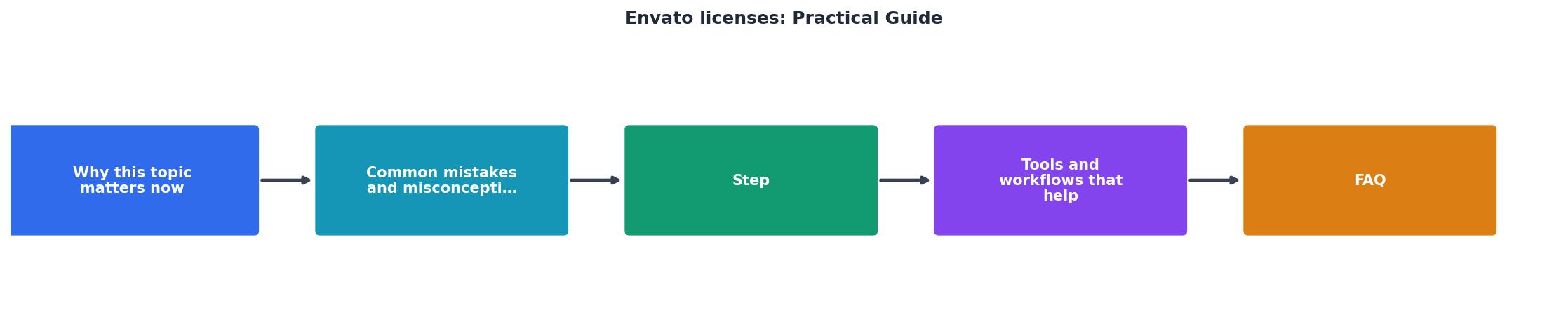
Here's the exact workflow:
- Browse and choose. Find the item on Envato Elements or Envato Market. Read the license section carefully.
- Check the license. For Market: confirm it's Standard or Extended, depending on your use case. For Elements: the license is always the same.
- Buy or download. Click the button. Complete checkout if needed.
- Download immediately. Go to your account downloads or purchases page. Download the license certificate PDF.
- Save to your license folder. Move the file to your central folder, named clearly.
- Download the asset file. Get the actual item (template, font, graphic, etc.) and save it alongside the license.
- Update your license spreadsheet. Add one line to your tracking sheet.
- Use it in projects. You're licensed. Use the item in client work, personal projects, or resale, depending on the license you bought.
- When delivering, include an Assets Used doc. List the licensed components so the client knows the scope.
Building your license dashboard
When managing multiple downloads across Envato and other platforms, a visual dashboard helps. Here's what a typical freelancer's license inventory looks like:
This example shows a typical freelancer managing both subscriptions and individual purchases. The key insight: organized licenses mean you can answer client questions in seconds, not hours.
Envato License Organization Checklist
Your progress is saved automatically in your browser.
FAQ
Frequently Asked Questions
Getting organized with Envato licenses doesn't take long, maybe an hour to set up a system and download your existing certificates. After that, it's a few minutes per purchase. The benefit is huge: you'll never scramble to find proof, you'll know exactly what you can and can't do with each asset, and your clients will trust you because you can answer their questions instantly.
Additional Resources
- Envato Elements License – Envato Support | Help Center - Guide to Performing Rights Organizations and PRO Music on Envato Elements Introduction to the Envato subscription License
- How to Create a New License on Envato - Go to My Downloads, select View licenses, then click Create new license. Open the item's page on Envato, click Licenses, then click Create new ...
- Envato social media license: YouTube, TikTok, and more - Envato's commercial license allows you to use downloaded assets on YouTube, TikTok, Instagram, Facebook, LinkedIn, Pinterest, and other social ...
Need to Download Your Licences?
Save hours of manual work. We download all your stock photo licence certificates for you.
Get Started“Thanks to LicenceDownloader.com, I was able to download more than 1,000 Freepik licences and receive them all at once via ZIP.”
Marlon Mainardy